

 Your inventory
 Sign in

Villager Trade Reroll
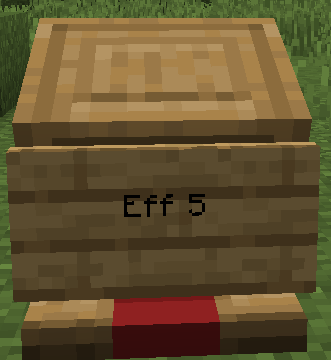
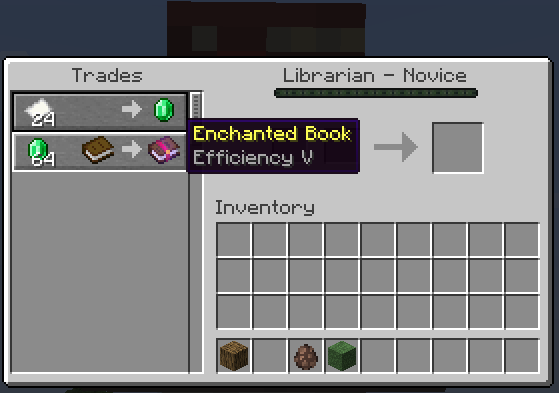
This mod enables instant rerolling of villager trades or enchantments via text input on attached signs. When no level is specified in the sign text, the mod automatically selects the highest available level for the corresponding enchantment. It supports rerolling blocked trades to higher levels where possible. Upon a successful reroll, green particles appear above the villager; if the operation fails, red anger clouds manifest instead. Players can specify exact levels using commands like `eff 3` for Efficiency III, and the mod automatically adjusts lower input values to match the maximum tier (for instance, entering `mending` results in Mending I). The functionality works with all station types: lecterns, looms, and composters.
Villager Trade Reroll: Custom Crafting for Villagers
This mod allows players to manually reroll villager trades by writing a desired item or spell on an enchanting table and right-clicking the station. The crafting interface accepts specific inputs to generate new trade options directly from the player’s actions.
Villager Trade Reroll
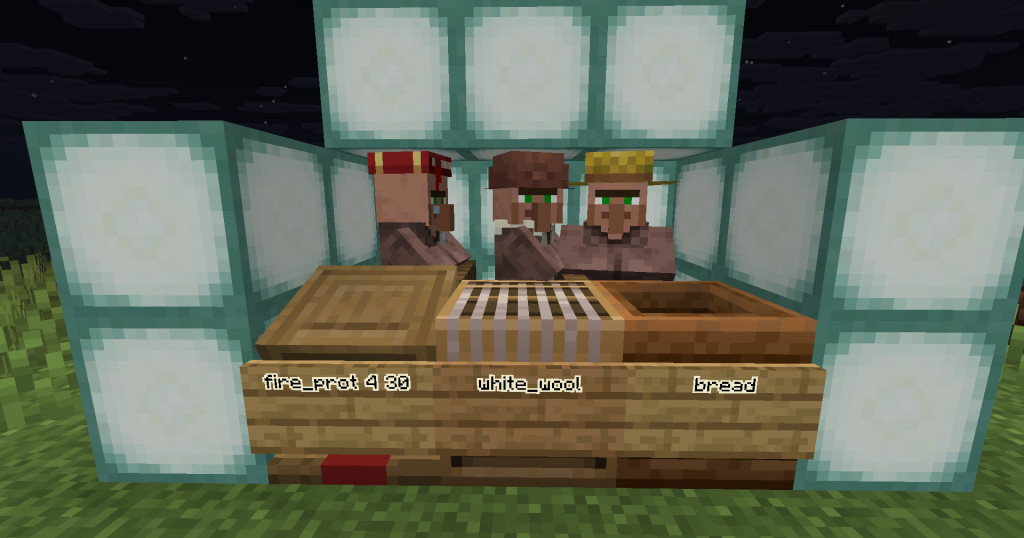
This mod allows players to instantly generate specific trades for villagers by entering the item name directly into the trade table. Typing ‘bread’ immediately offers a bread trade, while ‘iron_pickaxe’ or ‘golden_carrot’ triggers their respective deals. Successful rerolls are visually confirmed with green particles and a glowing effect around the villager’s face.
Villager Trade Reroll: Auto-fill Support for Minecraft 26.1+
This mod introduces automatic trade reroll functionality specifically for Minecraft version 26.1 and later. The feature allows players to instantly refresh available trades with villagers without manual intervention, streamlining the resource gathering process in supported game versions.
Minecraft versions and loaders
| Release | Minecraft | Loader / client | Dependencies |
|---|---|---|---|
| 1.0.1 | 26.3 | fabric, forge, neoforge, quilt | — |
| 1.0.5 | 26.3 | fabric, forge, neoforge, quilt | — |
Detailed characteristics 1
| Sign Text | Resulting Enchantment | Notes |
|---|---|---|
| `mending` | Mending I | Single tier enchantments auto-match |
| `eff` | Efficiency V | Defaults to max tier |
| `eff 3` | Efficiency III | Specific requested tier |
| `unbr` | Unbreaking III | Defaults to max tier |
| `fortune` | Fortune III | Defaults to max tier |
| `sharp` | Sharpness V | Defaults to max tier |
| `silk` | Silk Touch I | Instant match |
Detailed characteristics 2
| Sign Text | Resulting Trade |
|---|---|
| `bread` | Bread |
| `white_wool` | White Wool |
| `iron_pickaxe` | Iron Pickaxe |
| `golden_carrot` | Golden Carrot |
Project screenshots
Illustrations from the project author.
 How to install
Discussion 0
Share your experience, ask questions and help other players.
It is quiet here. Your experience could help someone.