

 Your inventory
 Sign in

What Jade does and who it helps
Jade adds an information overlay for the object the player is looking at. It continues Hwyla/Waila for modern Minecraft Java Edition versions, placing information about blocks, creatures and mechanisms directly over the game world.
The author highlights additional configuration options and improved accessibility compared with Hwyla. This guide covers specific gallery examples, default controls, server-dependent features and selecting a matching download.
What information the overlay can show
The author’s gallery illustrates the following uses, allowing players to examine the type of information before installation.
| Feature | Author example |
|---|---|
| Storage | Information about stored items; the author identifies storage information as needing server support. |
| Redstone | The component and its redstone parameters. |
| Creatures | Horse characteristics in the gallery example. |
| Storage contents | Item names and quantities, illustrated with a chest boat. |
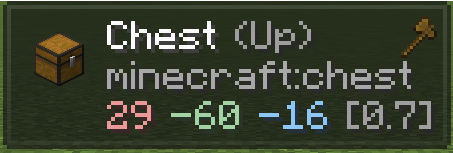
| Target position | Targeted face, coordinates and distance. |
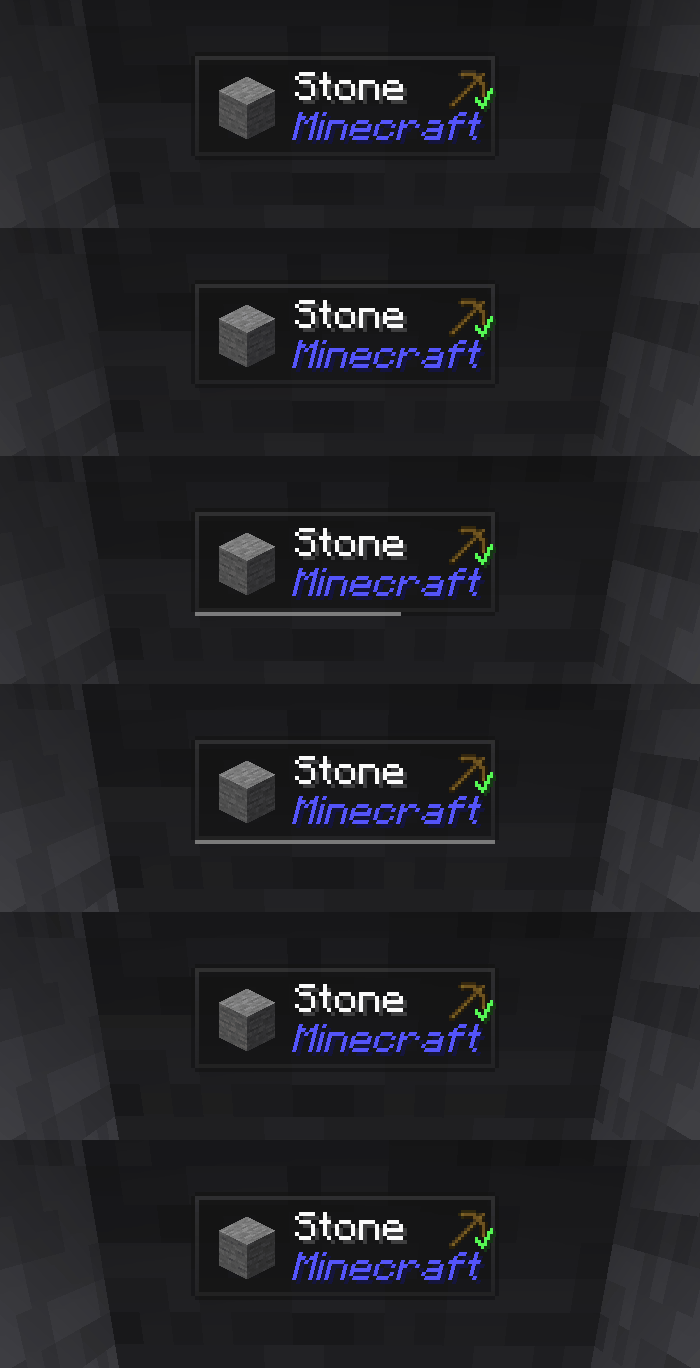
| Mining | Harvestability and mining progress. |
Redstone and mechanism information
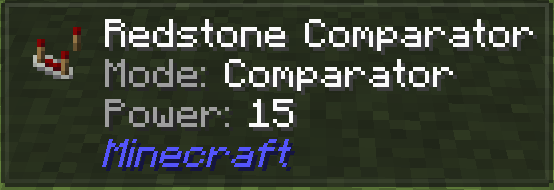
The author’s comparator image shows the object name, Comparator mode and a Power value. The displayed example has a signal value of 15.
This lets players relate a visible component to its current parameters. The parameter display supplements the basic object name.
Creature information
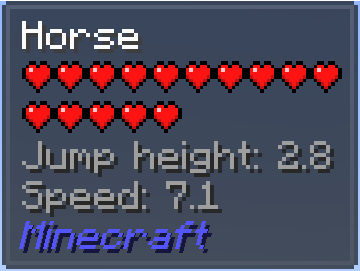
The horse example shows health, jump height and speed. These values let players compare individual animals using the information the overlay supplies.
The author’s screenshot shows Jump height 2.8 and Speed 7.1. These are values for the pictured horse, with the information read for the selected creature.
Item names and quantities in storage
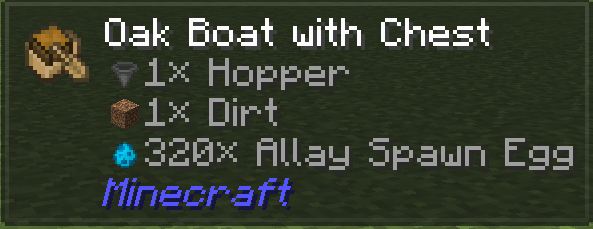
The chest-boat example displays more than item icons: names and quantities appear alongside them. Labels help distinguish the contents when an icon alone is insufficient.
Storage contents are among the features for which the author specifically notes the need for server-side Jade.
Target face, coordinates and distance
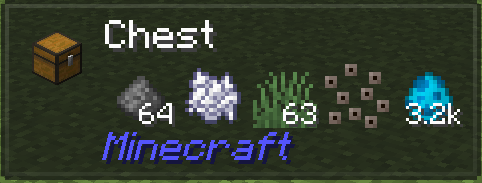
The chest screenshot shows the Up face, the minecraft:chest identifier, coordinates and distance to the object. This supplements the ordinary block name.
Such information helps identify the exact selected object and its position rather than relying only on its appearance.
Harvestability and mining progress
The author’s animation demonstrates harvestability and mining-progress information, making the current interaction state more apparent.
Open Jade’s configuration to adjust the overlay. The default keybindings are listed below.
Default controls and configuration
These bindings come from the author’s description. Keypad refers to the numeric keypad rather than the number row above the letters. If your modpack uses different assignments, consult its current controls.
| Key | Action | Additional condition |
|---|---|---|
| Numpad 0 | Open Jade configuration. | Default binding. |
| Numpad 1 | Toggle the overlay. | Default binding. |
| Numpad 2 | Toggle liquid display. | Default binding. |
| Numpad 3 | Look up recipes. | Requires JEI. |
| Numpad 4 | Look up uses. | Requires JEI. |
| Numpad 5 | Narrate the current target. | Default binding. |
When Jade is needed on the server
Jade can be installed on the client alone, but the author explains that many features need a server installation too. Examples include storage contents, brewing stand fuel and bees inside beehives.
A missing information line therefore does not necessarily mean the interface is broken. The overlay may work without receiving the relevant server data. The next step depends on whether a suitable server-side version can be installed and whether the chosen configuration supports the information.
| Situation | Interpretation |
|---|---|
| Jade is installed only for the player | The overlay can work while server information remains incomplete. |
| Storage, fuel or beehive information is needed | Check server-side Jade, as the author specifically calls out these cases. |
| Information about another mod is needed | Check the corresponding integration and supported versions. |
JEI and Jade Addons serve different purposes
JEI provides the recipe and use lookups bound to Numpad 3 and Numpad 4. The description explicitly marks both actions as requiring JEI. The selected release metadata lists JEI as optional for Jade overall.
Jade Addons is a separate integration project. The author links NeoForge and Fabric editions. Match any add-on to the game version, loader and required integrations.
Read Fabric API requirements for the individual download. For example, the selected Jade 26.3.5+fabric release lists Fabric API as required. This is not evidence of the same requirement for every older release.
Choosing a version and installing Jade
Jade maintains different Minecraft and loader branches. Five selected stable downloads are shown here and in the downloads section; this is not the complete release archive. Jade’s release number and the Minecraft version are separate values.
- Choose a Minecraft profile and corresponding loader. Read the selected file’s metadata rather than relying on the project-wide compatibility list.
- Obtain Jade from the author’s page and install the matching file using your loader’s instructions. Add the dependencies required by that specific release.
- Arrange a suitable server installation for server-dependent information. Check JEI-dependent features separately.
- Use the author’s full release catalogue for other Minecraft versions and loaders.
| Jade release | Minecraft | Loader and dependencies |
|---|---|---|
| 26.3.5+neoforge | 26.3 | neoforge; JEI — optional; no required dependencies listed in release metadata. |
| 26.3.5+fabric | 26.3 | fabric, quilt; Fabric API — required; JEI — optional. |
| 26.1.12+neoforge | 26.1, 26.1.1, 26.1.2 | neoforge; JEI — optional; no required dependencies listed in release metadata. |
| 15.10.6+neoforge | 1.21.1 | neoforge; JEI — optional; no required dependencies listed in release metadata. |
| 11.13.3+forge | 1.20, 1.20.1 | forge, neoforge; JEI — optional; no required dependencies listed in release metadata. |
If expected information is missing
Check the specific symptom before adding more mods.
- Overlay switched off: check Numpad 1 and configuration through Numpad 0.
- Liquids missing: check Numpad 2 and the current settings.
- Recipe or use lookup unavailable: these functions require JEI.
- Storage contents, fuel or beehive information missing: check server-side Jade.
- A third-party block lacks support: check the integration; the author recommends an appropriate Jade Addons release.
- Download does not match the profile: compare the exact Minecraft version, loader and release dependencies.
 How to install
Discussion 0
Share your experience, ask questions and help other players.
It is quiet here. Your experience could help someone.