Your inventory
+ Suggest a resourceSign in
CATALOG RESOURCE

Lower Shields: a lower shield in first-person view

03.11.2026 · Compatibility not verified

↓ Choose a version
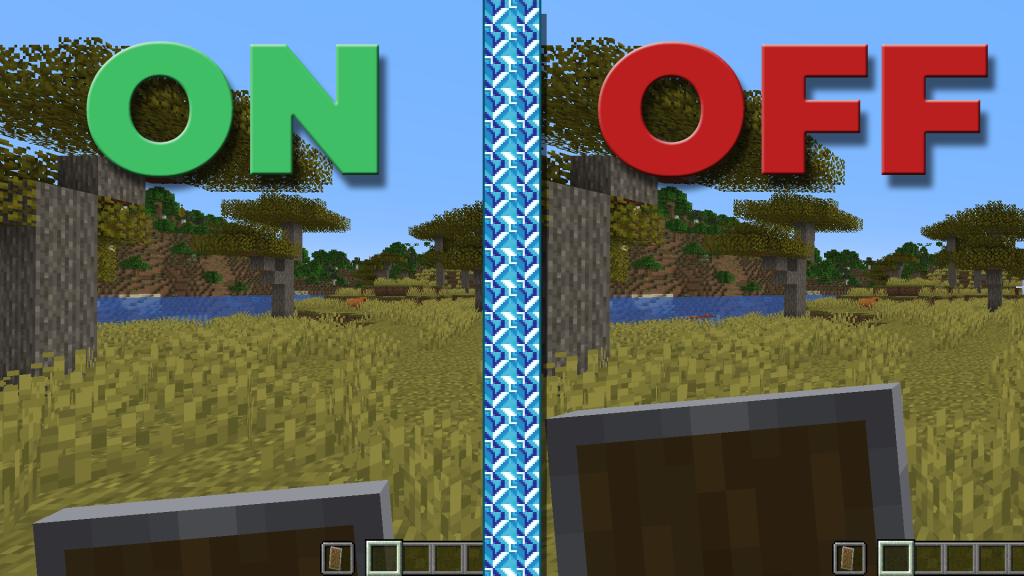
Скриншот демонстрирует разницу между включенным (ON) и выключенным (OFF) режимом понижения щита в Minecraft. Левая часть показывает вид с пониженным щитом, улучшенным обзором, правая — стандартный вид

What the resource pack does

Lower Shields lowers the shield in first-person view to leave more of the screen visible. It is a visual adjustment for general play and PvP; the description explicitly states that it does not change gameplay mechanics.

Selected release files

The metadata below describes specific author-provided files. Resource release, platform and Minecraft version are separate fields.

Release Minecraft Platform Required
1.0.1 1.21.4 minecraft —
1.0.1 1.21.5 minecraft —
1.0.1 1.21.6 minecraft —
1.0.1 1.21.7, 1.21.8 minecraft —
1.0.1 1.21.9, 1.21.10 minecraft —
CHOOSE YOUR BUILD

Available downloads

The edition, Minecraft version and loader or client must match the selected file.

Latest release

1.0.1

Edition / projectMinecraft Java Edition
Game / loader / clientminecraft
Minecraft version1.21.4
File size0.17 MB
Release date2026-11-01
Last verifiedNot specified
Author-provided SHA-256No checksum provided
Older versions 4
Archived release

1.0.1

Edition / projectMinecraft Java Edition
Game / loader / clientminecraft
Minecraft version1.21.5
File size0.17 MB
Release date2026-11-01
Last verifiedNot specified
Author-provided SHA-256No checksum provided
Archived release

1.0.1

Edition / projectMinecraft Java Edition
Game / loader / clientminecraft
Minecraft version1.21.6
File size0.17 MB
Release date2026-11-01
Last verifiedNot specified
Author-provided SHA-256No checksum provided
Archived release

1.0.1

Edition / projectMinecraft Java Edition
Game / loader / clientminecraft
Minecraft version1.21.7, 1.21.8
File size0.17 MB
Release date2026-11-01
Last verifiedNot specified
Author-provided SHA-256No checksum provided
Archived release

1.0.1

Edition / projectMinecraft Java Edition
Game / loader / clientminecraft
Minecraft version1.21.9, 1.21.10
File size0.17 MB
Release date2026-10-17
Last verifiedNot specified
Author-provided SHA-256No checksum provided

How to install

  1. Check the edition, Minecraft version and loader or client in the table.
  2. Back up your world and read the author’s instructions.
  3. Download the selected file and follow the author instructions for your edition.
  4. Launch the game and check it in a separate test world.

Java: check Vanilla, Forge, Fabric or NeoForge. Bedrock: follow the add-on or world author instructions. Rust clients require separate compatibility testing.

HELP IMPROVE THE CATALOG

Report a problem

Include your version and describe the issue. Your report will be visible to site editors.

Do not include passwords, tokens or other personal information. Privacy policy

WAS THIS ARTICLE HELPFUL?

Reader rating

Rate how useful this article is. Mod compatibility is checked separately by editors.

Be the first to rate this article.

Sign in to rate this article.

PERSONAL COLLECTION

Your inventory

Your collection is stored in this browser. No account required.